Intro: What a swipe file really is
Building a swipe file doesn't mean randomly screenshotting ads and dumping them in a folder. It's a systematic collection of ads, content, and market signals that you actively analyze and evaluate — and use to shape your own strategy.
I constantly see founders who save tons of ads but have no system behind it. Then they're sitting in front of hundreds of screenshots with no idea why that one ad performed so well, or what discount level actually protects the margin. That's collecting, not analyzing.
The real value of your swipe file: it shows you the patterns that work in your market — not because some theory says so, but because real competitors are spending real money on them.
Why a swipe file alone doesn't work
Most founders collect wildly and hope the answer just shows up on its own. Spoiler: it doesn't.
An unsorted swipe file is like a library with no catalog. You have the books, but it takes hours to find the one you actually need. And worse — you never see the structure behind it.
Some agencies save hundreds or thousands of ads and walk away with zero learnings, because the ads were never tagged. When did it run? Which audience? What copy pattern? Were there multiple variants running at once? All gone — all that's left is the picture.
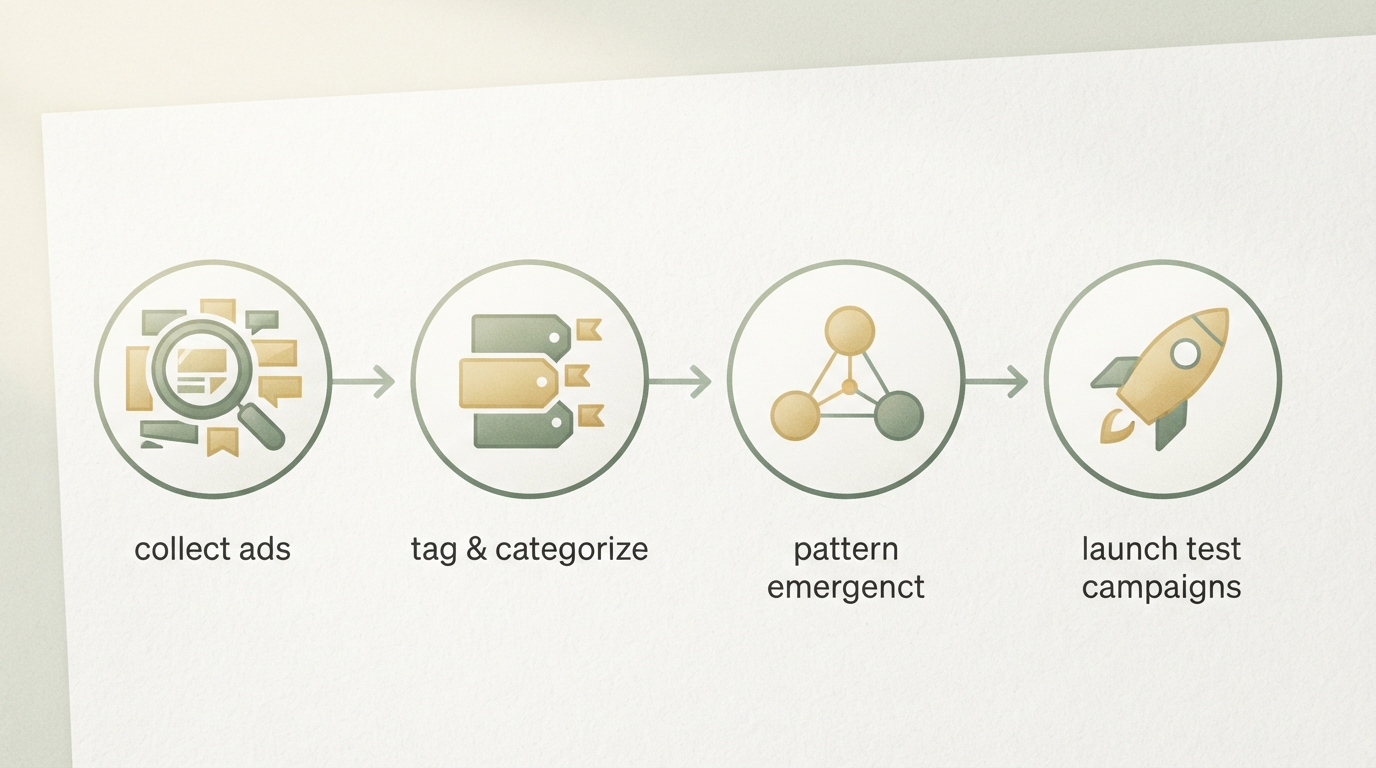
Your swipe file only becomes valuable once three things come together:
- You capture the right metadata from the start.
- You tag systematically by pattern, not by gut feeling.
- You search it with intent later and turn it into concrete test ideas.
Step 1: What to actually collect — not everything
Not every ad you like belongs in your file. Otherwise you're back to chaos.
Collect ads from direct and indirect competitors, but especially ones that run for a while. An ad that ran once tells you nothing. An ad that's been active for weeks tells you: "This works well enough to be worth it."
Just as important: ads from adjacent markets where your audiences overlap. If you sell a B2B tool for HR managers, don't just look at HR software ads — look at finance tools, compliance software, and recruiting platforms too. The same decision-maker sees all of them.
Add to that creatives from your own older campaigns that performed well. We often forget what we've already tested ourselves, even though our best learnings are often sitting in our own archives.
Skip the generic stock photos, skip ads that are obvious flops (spoiler: you can't tell that from the image alone), and skip campaigns from completely unrelated markets (a fitness shake and B2B accounting software just don't speak to the same audience).
Rule of thumb: if an ad looks more than 3 months old and isn't running anymore, don't bother saving it. Markets shift.
Step 2: Capturing metadata — the system nobody does
This is where the real mistake happens: founders save the image but not the context.
Every ad needs a minimum data set:
- Source: Which platform? (Instagram, TikTok, LinkedIn, Google Search Ads, podcast sponsorships, …)
- Advertiser (if identifiable): Who's running it? A direct competitor, an indirect player, an affiliate?
- Audience (estimated): Who's this meant for? Age group, job title, industry, purchasing power?
- Hook / copy lead: The opening line or visual hook (what stops the scroll?)
- Call-to-action: Where does it send me? Landing page, lead magnet, direct sale, newsletter?
- Visual / format: Carousel, single image, video, text-only, …?
- Date saved: When did I see it?
Sounds like a lot, but it only takes about 60 seconds per ad. And that 60-second effort is the difference between "nice picture" and "I understand why this works."
Here's a real-world example: you save a LinkedIn ad with an image. Done. Six weeks later you need a hook idea for CFO personas. You dig through 200 ads and vaguely remember, "There was a good offer somewhere in here…" — but without tags, you're burning hours again.
Try it on a real example: if you'd tagged day-one's ad as:
- Platform: LinkedIn
- Audience: CFO / Finance lead
- Hook type: "Pain" (cost problem)
- Format: Text + chart
… you'd find it in 10 seconds and know instantly why it's relevant here.
Step 3: Tagging structure — by pattern, not by gut feel
This is where it gets concrete. Your swipe file needs a classification based on actual patterns, not arbitrary categories.
The classifications that actually work:
| Dimension type | Examples | Why it matters |
|---|---|---|
| Copy pattern | Question, statistic, pain point, contrast, social proof | You'll later search specifically for "question hooks" |
| Emotion | Fear, hope, envy, relief, power | Different audience segments respond to different feelings |
| Offer structure | % discount, guarantee, scarcity, free trial | Shows which offer mechanics work in your market |
| Audience signal | Job title, industry, purchasing power, pain point | Sharpens your targeting later |
| Conversion path | Lead → webinar → sale; direct sale; community-first | Different markets need different funnels |
Practical tagging example:
You save a Facebook ad from an accounting tool:
Source: Facebook
Advertiser: [Competitor X]
Audience: Small business owner, solopreneur
Hook pattern: Pain ("Bookkeeping is costing you 10 hours a week")
Emotion: Relief ("Automatic. Ready to go instantly.")
Offer: 14-day free trial + onboarding
Format: Video (30 sec)
Conversion path: Lead → sales call
Later, you search your file for: "Show me all ads with hook pattern = pain AND emotion = relief." Boom: 15 examples, all from successful competitors. That's your pattern.
Step 4: Using your inspiration collection — turning it into insight
Now comes the step 90% of founders never take: you stop looking at individual ads and start looking at clusters.
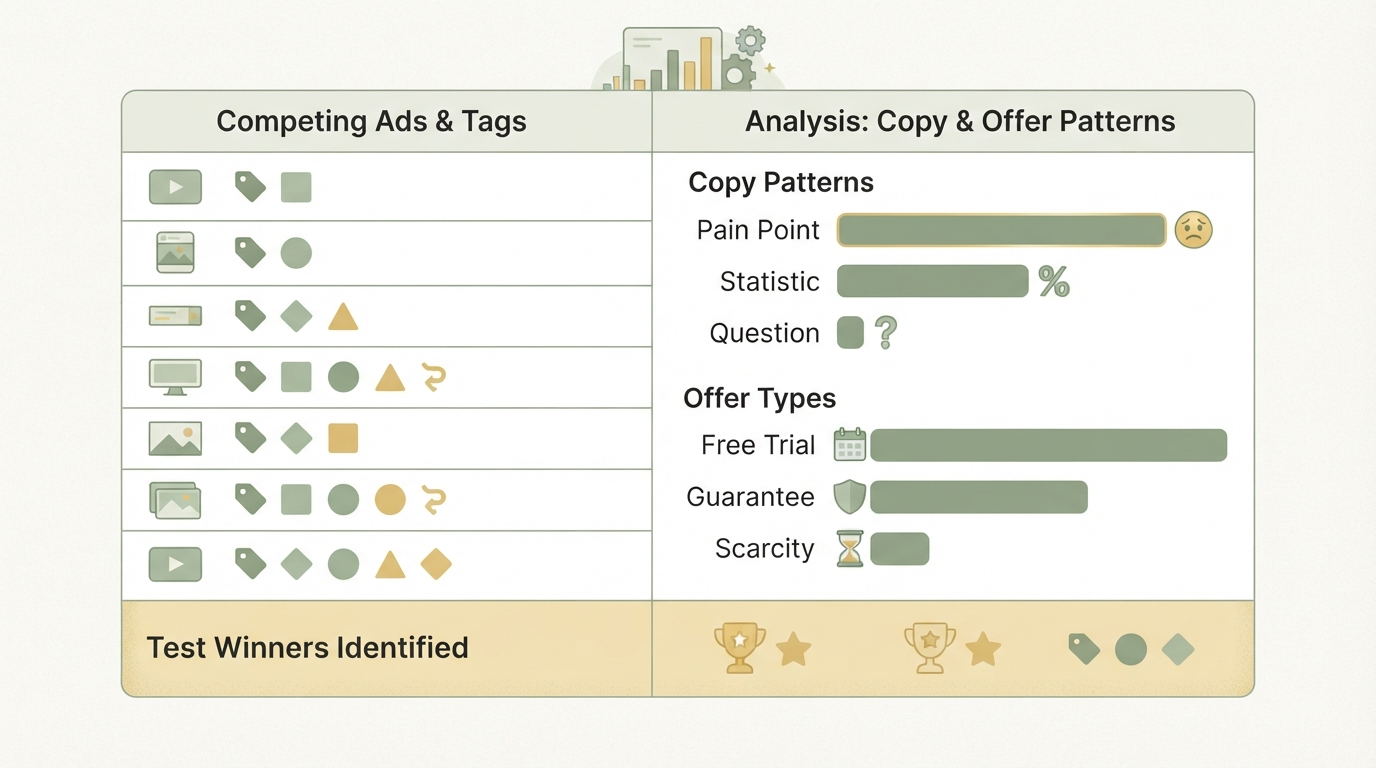
Say you've been tagging new competitor ads regularly for two months. Now you run a pattern analysis:
-
Copy pattern frequency:
- Pain hooks show up most often → this is the most reliable approach
- Statistic hooks are also popular, but less frequent → still strong, but more situational
- Question hooks are rare → riskier or more niche
-
Offer structure distribution:
- Free trials are the standard offer → that's what buyers expect
- Money-back guarantees show up regularly → maybe a trust signal is needed
- Scarcity (limited spots) is the exception → only works in certain markets
These insights lead to tests, not guesses:
The first variant tests the most common hook type, because the data shows it works.
The second variant combines the two most frequent patterns, to see if they reinforce each other.
A third variant runs as a control with your current copy, to see where you currently stand.
That's collecting ads and turning it into strategy.
Step 5: Organize your swipe file with the right tools
Chaos happens when you try to keep everything in your head. You need a system that's easy to search.
Your best options:
Notion or Airtable: The classics. A table with fields for platform, hook type, audience, offer, and a link to the original screenshot. Filterable by any field. Once you've got 200+ ads, this saves you serious time and mental energy.
Figma or Miro: Great if your ads are highly visual and you want to build clusters or inspiration boards. Less suited for structured analysis, but stronger for the creative "feel" of trends.
Google Sheets: Good if you're working with a team. Shared, simple, not fancy but it works. Also great for quick pivot tables ("How many ads use scarcity on LinkedIn?").
Custom tool: If you're really collecting at volume (500+ ads), it might be worth building a small CSV-import system or checking out an existing ad-tracking solution. But for most founders, that's overkill.
The tool choice is secondary. Structure is primary. A spreadsheet with good tagging always beats a "fancy tool" full of messy data.
What competitors won't show you — using your own archives
An often-forgotten part of your swipe file: your own old campaigns.
Treat your own archives with the same seriousness as competitor ads: what was the hook on that ad? What emotion? What offer? Don't just copy the winners — look at what performed and what flopped.
Sometimes I see founders who had a perfect ad six months ago, then write something completely different and wonder why it's not working. The answer is sitting in their own archives.
Ask your team too: which emails had the highest click rates? Which social posts went viral? These patterns are part of your market. They belong in the ad archiving system you're building.
The most common mistakes when building a swipe file
Mistake 1: You save visually, but never analyze. Fix: every ad needs 5 minutes of analysis. Why did this work? What's the hook? Who's the audience?
Mistake 2: You're not tagging consistently. One ad gets called "pain ad," another gets called "problem lead" — and suddenly your search breaks. Write your taxonomy once, then stick to it.
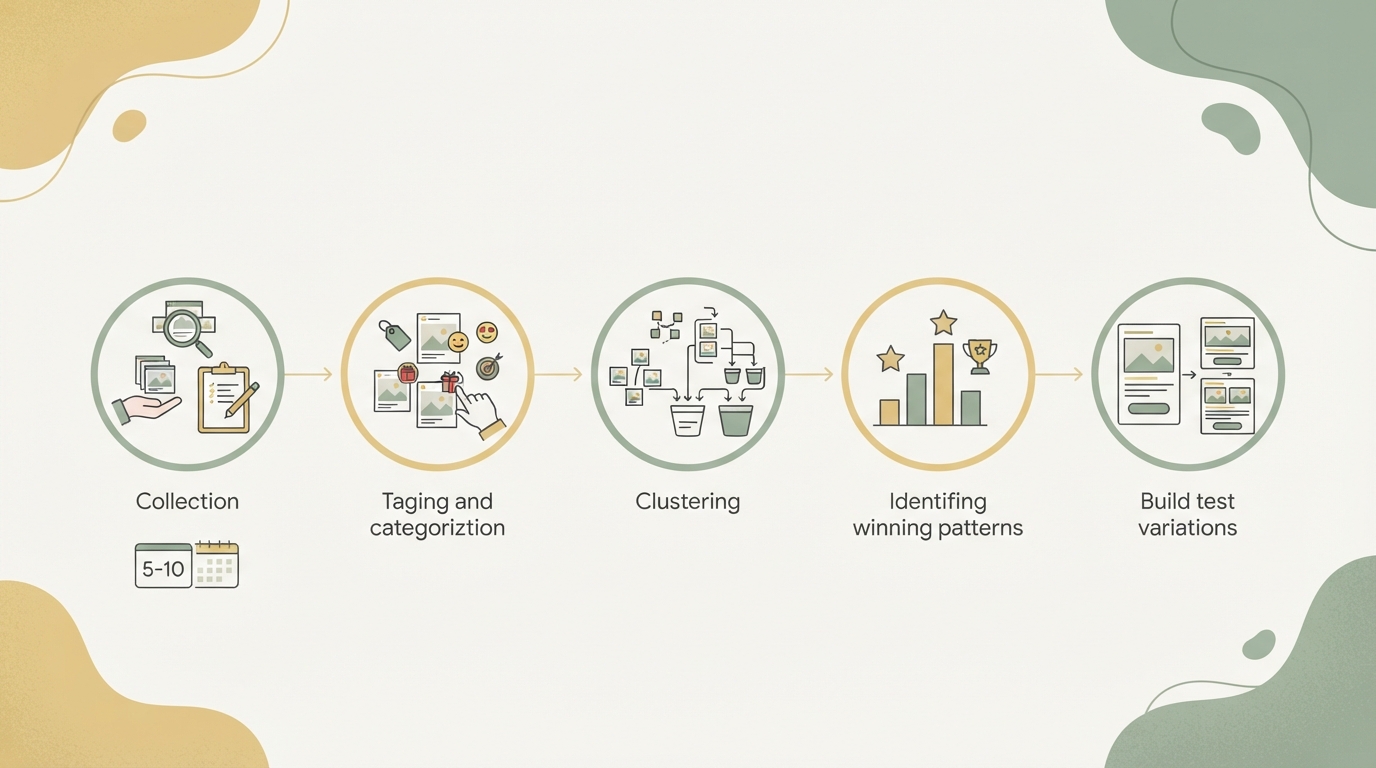
Mistake 3: You collect, but never go back and look. The swipe file just gathers dust. Fix: every Monday, spend 30 minutes: what are competitors running right now? Tag 5–10 new ads. And once a month: "Which pattern am I testing this month?"
Mistake 4: You imitate directly instead of adapting. A big competitor launches a new landing page, and you copy it almost word for word. That won't work, because your market, your audience, and your pricing are different. Use it as inspiration, not a blueprint.
Mistake 5: You only save winners and ignore the flops. Sometimes knowing what doesn't work is just as valuable. If a big agency pulls a campaign after two weeks, that's a signal too — even if you never see the ad again.
How Starte.ai helps — and when to roll up your sleeves yourself
Very few people do this market-analysis work systematically: collecting real ad patterns, tagging them by success signals. Usually the time and the structure just aren't there. At Starte.ai, we're building exactly that kind of knowledge system: we collect ads from thousands of real projects, structure them, analyze them, and show you not just what's working, but why.
Start small: if you're building your own swipe file, start with 20–30 competitor ads. Tag them, understand them, draw conclusions. Then let your system grow from there. After three months, you'll have a foundation real strategy can be built on.
The next step: turning your inspiration collection into a test plan. If you want to know which offer structure is most likely to drive conversions in your market, check out how to build a proper sales funnel.
Frequently asked
How many ads should I add to my swipe file?
It's not about volume, it's about quality and the system behind it. Collect ads from direct and indirect competitors that are demonstrably working — meaning ads that have been running for weeks. A messy pile of hundreds of screenshots won't help you if you can't analyze it.
What metadata is important when saving an ad?
For each ad, capture: the platform, the advertiser, the estimated audience, the hook or copy lead, the call-to-action, the format, and the date you saved it. This 60-second effort per ad is the difference between wildly collecting and actually understanding — without this info, you can't search for it with intent later.
How long should I collect ads in my swipe file before analyzing them?
Two months of regular tagging gives you enough data to spot real patterns. After that, you can evaluate which copy patterns, emotions, and offer structures run most often, and turn those insights into concrete A/B tests.
Can I add my own old ads to my swipe file too?
Yes, absolutely — it's actually very valuable. Many founders forget their own successful campaigns and end up reinventing the wheel. Your best learnings are often sitting in your own archives, so tag and collect those systematically too.
Written by
Bohdan BernatekFounder, Starte.ai
Founder of Starte.ai. Built a business to 125,000+ organic leads and seven-figure revenue — and now works with founders personally, deriving a strategy for their own brand from data across thousands of real projects and producing the creatives for it.