What does AI automation for solo entrepreneurs actually mean?
AI automation for solo entrepreneurs means handing off recurring tasks — writing quotes, sorting customer inquiries, producing content — to AI tools that run on their own once set up. If you want to implement AI automation as a solo entrepreneur quickly, the perfect tool matters less than the right order of operations: pick the task first, understand the process second, and only then go looking for a tool. The difference from classic automation (Zapier rules, fixed templates) is that AI systems can also understand unstructured input — an email, a voice memo, a photo — and still produce a useful output.
As a solo entrepreneur, you don't have a department to test this stuff for you.
You have to decide yourself what's worth doing. And that's exactly where most people fail — not on the technology, but on the selection.
Things to check before you buy any tool:
- The task comes up at least once a week (otherwise setting it up barely pays off)
- There's a clear input and a clear output (email in, reply out)
- You can measure success in minutes or euros
- A mistake here is forgivable, not business-threatening (so don't pick invoicing your biggest clients as your first project)
- A tool or template for it already exists — you don't need to code it yourself
Implementing AI automation as a solo entrepreneur fast: where do you start?
The fastest way in is to automate the task you hate most, not the one with the biggest theoretical potential. Sounds obvious, but potential is hard to estimate if you've never automated anything before.
Frustration, on the other hand, you feel immediately — before you've measured anything at all.
I did it the wrong way at first and tried to solve the "big" problem right away — automating the entire customer service process before I even knew what a single automation flow felt like in practice. The result: three weeks of tinkering, no finished result.
Starting small isn't an excuse here — it's the actual strategy.
Paul Graham put it well in his essay "Do Things That Don't Scale": early on, manual work and a tight focus pay off more than a system built for ten thousand cases that doesn't yet work for even one.
Step 1: Find the one task that's actually worth it
Make a list of every task you repeat in a normal week. Writing quotes, creating invoices, drafting social media posts, answering customer inquiries, coordinating appointments. Next to each one, jot down roughly how much time it costs you — a rough estimate is fine.
Then rank them by two factors: time spent multiplied by frequency. A task that takes 10 minutes but happens daily beats a task that takes 2 hours but only happens once a month.
Pick the task at the very top of the list — and only that one, not a second one at the same time.
If prioritizing is hard because you don't know what others in your industry have already automated successfully, it helps to look at real project data instead of pure gut feeling. That's exactly why we built the Trend Finder at Starte.ai: it shows you which automation and niche ideas are gaining traction in your market right now, complete with estimated revenue and traffic numbers.
Step 2: Write down the process before any tool enters the picture
Before you open any AI tool, write out the process in plain text — exactly how you currently do it manually. What's the first step? What information do you need for it? Where do you make a decision, and by what rule?
This is the step almost everyone skips.
They open ChatGPT or an automation tool and just start experimenting. The problem: an AI can only automate what you can clearly describe. If your own process is already unclear, the automation's output will be unclear too.
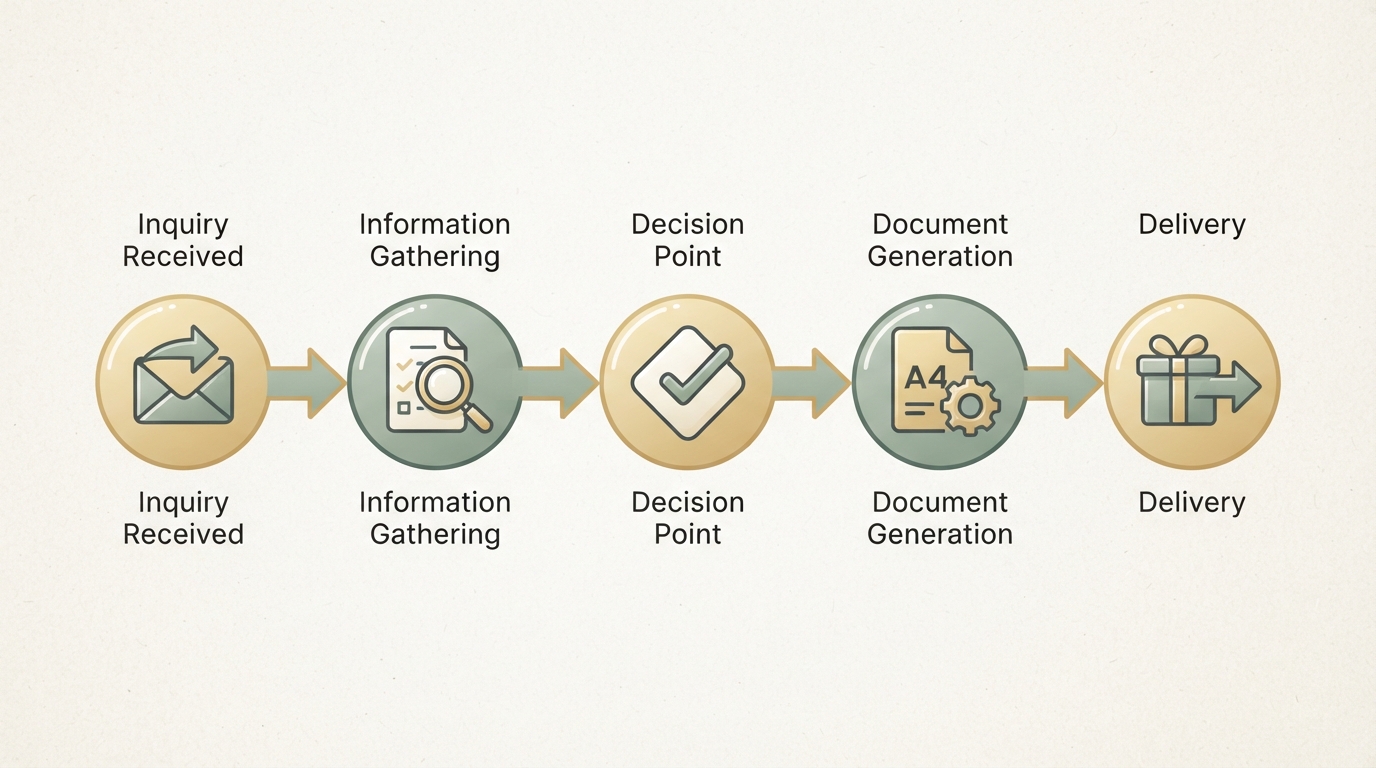
A real-world example: creating quotes. Manually, it often looks like this: read the customer inquiry → find the matching services → look up prices → write the text → send as PDF. Each of these five steps can be automated or AI-assisted individually. Skip writing it down, and you'll end up automating only part of the process — then wonder why the rest still eats up your time.
Step 3: Choose the right tool
There are three basic ways to automate a task with AI, and they differ a lot in effort and control. No-code platforms with a built-in AI block are the quickest to set up, AI agent tools offer more flexibility for unstructured tasks, and writing your own code (or using an AI coding assistant) gives you full control, but costs more time upfront.
| Approach | Setup time | Control | Best for |
|---|---|---|---|
| No-code + AI block (e.g., automation platform with GPT integration) | Hours to 1 day | Medium | Recurring text tasks, email sorting |
| AI agent / assistant tool | 1–3 days | Medium to high | Customer inquiries, research, content drafts |
| Custom code / AI coding assistant (Cursor, Claude, ChatGPT as pair programmer) | 3 days to 2 weeks | High | Custom workflows, data processing, integrations with your software |
For most solo entrepreneurs, the middle lane is the right one: an AI agent tool that connects to your existing systems (email, CRM, calendar) without requiring you to code. Only once an automation has proven genuinely profitable does it make sense to invest in a custom solution.
A great example of how closely a good automation idea can tie into a specific, often underrated problem: {{saas:vector.co}} identifies anonymous website visitors based on company data so B2B marketers can target them directly — a task that used to be entirely manual, if it was done at all. The estimated numbers (around 99,000 visits per month, according to our data) show that a tightly scoped automation solution for a single, clearly defined problem often outperforms a general-purpose tool.
Step 4: Actually build your first automation flow
Now it gets concrete: you connect input, AI processing, and output into a single, traceable flow. Start with the simplest case, not the most complicated one. If 80% of your customer inquiries revolve around three standard questions, build the flow for just those three first — keep handling the remaining 20% yourself.
Rob Walling makes a similar point in his bootstrapping approach: a small piece of software that actually works and saves real money or real time beats a huge project that never gets finished. Applied to your automation: a flow that covers 80% of standard cases and actually runs is worth more than a flow meant to cover 100% that's still stuck in testing four weeks later.
If you're unsure what such a flow should technically look like — which tools, what feature scope, which prompts you actually need — a structured blueprint beats trial and error. That's exactly what our Blueprint tool is for: it turns your idea into a concrete feature scope, a matching tech stack, and ready-to-use prompts you can drop straight into ChatGPT, Claude, or Cursor.
Step 5: Test before you scale
An automation flow you haven't tested is a risk, not a tool.
Run the flow alongside your manual work for two to three weeks before relying on it completely. Compare the results: Is the AI making the right call? Is the tone right for your customers? How often do you need to step in?
A simple rule of thumb that often holds up in practice: if the error rate is under 10–15% and the errors are easy to spot (not hidden), you can put the flow into production and keep spot-checking it. If it's higher, the prompt or the data the AI receives is usually still missing context.
This is also where a consistent tone of voice matters — especially when AI is sending texts, quotes, or replies on your behalf. I go into more detail on how to nail down that tone once, for good, in the post on creating brand guidelines — a document you can essentially hand to the AI as an instruction manual.

Step 6: Build automation into your marketing and your offers
A good automation doesn't just save time — it becomes a selling point in itself. If you can now send out quotes in minutes instead of days, that's worth mentioning in your messaging — without overselling it, but as a genuine edge over competitors still doing everything by hand.
Just don't talk endlessly about your tool stack — talk about the outcome for the customer.
"Faster response time" sells better than "we now use AI." If you want to build out your positioning strategically as a whole, not just the automation angle, check out the article on developing a creative strategy.
And if you're wondering whether your automation idea could even turn into a small product for other solo entrepreneurs: take a look at how other AI-powered tools found their first niche. The breakdown of Langdock shows nicely how a team built an entire platform out of one narrow, very specific automation task.
Which tasks can solo entrepreneurs automate fastest?
The tasks with the fastest payoff are usually the ones with the clearest, most repetitive text pattern: quotes, invoices, standard email replies, appointment confirmations, and first drafts for social media content. These tasks have fixed structure, little room for judgment calls, and an output you can check quickly.
Things get harder with tasks that require a lot of human judgment — price negotiations or complex client consulting, for example. You can support those (research, summaries, suggestions), but I'd currently advise against handing them off entirely. Not because it's impossible, but because the loss of trust from a mistake in those moments costs more than the time you'd save.
What does AI automation typically cost for solo entrepreneurs?
Costs depend heavily on how custom the solution needs to be — anywhere from a few euros a month for a standard tool to a larger one-time investment for a tailor-made solution. Many no-code platforms with AI features start at around €20 to €50 a month for the basic tier; AI agent tools tend to land in a similar range, depending on usage volume.
The bigger cost factor usually isn't the tool price — it's your own time for setup and testing. Realistically budget a few hours a week over two to three weeks for that, not just one afternoon.
Comparing automation tool types: which one fits you?
| Criterion | No-code + AI block | AI agent tool | Custom development |
|---|---|---|---|
| Technical know-how needed | Low | Low to medium | Medium to high |
| Typical setup time | Hours | Days | Weeks |
| Ongoing costs | Usually low | Medium | Variable, depends on scope |
| Maintenance effort | Low | Medium | Higher, requires ongoing adjustments |
In the end, it matters less which tool looks the most powerful on paper. What matters is whether you can get something small up and running in one to two weeks that you'll actually use every day. Start with that one task, write down the process, test it alongside your manual work for two to three weeks — and only then think about the next automation. That's how you implement AI automation as a solo entrepreneur, fast: start small, test honestly, then expand.
Frequently asked
How long does it take to implement AI automation as a solo entrepreneur?
According to the post, it can work within one to two weeks if you focus on a single time-consuming task instead of testing several tools at once. The key is not trying to automate your entire customer service right away — finish building one single flow first before moving on.
Which task should I automate first?
Ideally the task you hate most, not the one with the biggest potential — since potential is hard to estimate if you've never automated anything before. Prioritize by time spent multiplied by frequency: a 10-minute task that comes up daily beats a 2-hour task that only happens once a month.
Do I need programming skills for AI automation as a solo entrepreneur?
No, for most cases an AI agent tool that connects to existing systems like email, CRM, or calendar is enough — no coding required. Writing your own code or using an AI coding assistant gives you full control, but according to the post, it's only worth it once an automation has already proven profitable.
Why do so many solo entrepreneurs fail at AI automation?
Usually not because of the technology, but because of poor task selection and not clearly writing down their own process beforehand. An AI can only automate what you can clearly describe — if your process is unclear, the automation's result will be unclear too.
Written by
Bohdan BernatekFounder, Starte.ai
Founder of Starte.ai. Built a business to 125,000+ organic leads and seven-figure revenue — and now works with founders personally, deriving a strategy for their own brand from data across thousands of real projects and producing the creatives for it.