What a UGC script actually is
A UGC script is a set of instructions for creators who are introducing your product — without coming across as paid influencers. It's not as stiff as ad copy, but not as loose as free-form content either. The goal: make it look like a genuine product discovery, while still hitting exactly the messages your campaign needs. If you want to write a UGC script that actually works, you need both things at once: structure and naturalness.
Most companies write these too long, too polished, too vague. The creator needs to feel comfortable with your text — and that only happens if it sounds natural and can be read in seconds.
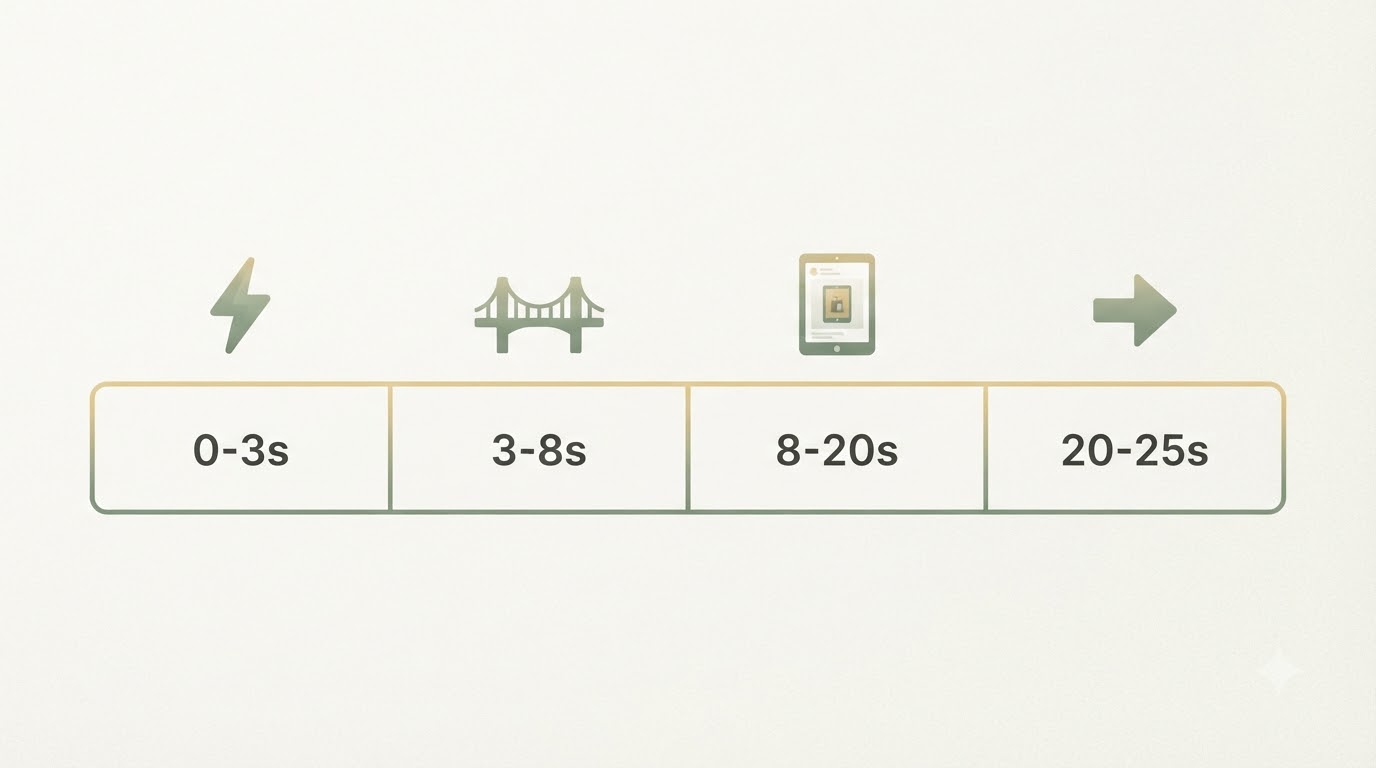
The four building blocks of a UGC script that works
Every good UGC video script follows this structure:
1. Hook (0–3 seconds) The hook stops the scroll. No greeting, no preamble. Instead: an emotion, a problem, or a spark of curiosity.
Example for a productivity tool:
"Wait — your team's still checking off tasks one by one even though…"
Or the negative trigger:
"If your tool hasn't shown you something useful in 5 seconds, you've already lost them."
2. Bridge (3–8 seconds) Now you describe the problem or state the viewer is in — or was recently in. This is what builds connection.
"I get it — three browser tabs open for planning, docs, and time tracking. Every single day. For years."
3. Proof (8–20 seconds) This is where the creator shows your product in action. The longest section. One feature, one flow, a sequence of screenshots — live or quick cuts. This isn't description, it's making it visible that the thing actually works.
"With [Product Name] you pull all three together. Task goes in, time gets tracked, results land on one dashboard."
4. CTA (20–25 seconds) Not "buy now." Instead, a low-friction next step: check the website, try the free plan, link in bio.
"Link in my bio — try it free, no credit card needed."
How to actually write a creator briefing script
A creator briefing script differs from a full shooting script in that it gives the creator room — but within a clear structure.
Step 1: Define the problem clearly
Don't say "we want to show off our tool." Say exactly WHICH pain point of the viewer gets solved — and why the creator can make that believable.
Example:
Target audience: Digital marketers who analyze their own campaigns
Problem: They lose hours every week piecing together ads, website, and CRM data in Google Sheets.
Why it matters: Those lost 3–4 hours a week are the reason they can't get strategic — they're stuck in reporting mode.
Step 2: Break down what makes your product unique
What does your product do DIFFERENTLY from the three alternatives the viewer might already know?
Not "our tool is easier." Instead: "Unlike Tableau or Data Studio, you see in one view where your leads are stuck, which ad they clicked, and what you're paying per lead. Done."
That's a decisive point of use, not just a feature.
Step 3: Offer hook options
Creators like having a choice. Give 2–3 hook variations — depending on how they want to hit their tone.
| Hook style | Example |
|---|---|
| Negative trigger | "If you're still checking your ads manually, you don't need to see this." |
| Curiosity gap | "The one metric I always felt was missing — now I found it." |
| Concrete problem | "30 tabs open just to figure out if the campaign's running? Over." |
The creator picks the tone that fits them — and that's exactly right.
Step 4: Plan the proof sequence
Give concrete screen-share steps. Not vague ("show the dashboard"), but:
- Click on Campaigns
- Filter by date (last 7 days)
- Show the "Cost per Lead" column
- Scroll down to a single campaign's details
Each step is 2–3 seconds of screen time. Together that's 8–12 seconds — perfect.
Step 5: Nail down the CTA
What should the viewer do next? And why?
"The app is free for your first 500 records. Link in my bio."
That's realistic, low-friction, and something the creator can say and mean.
What creators actually need in a script
Creators hate over-written scripts. The best ad video script gives structure, not a script to recite.
What's useful:
- Hook and bridge as exact wording (because those 8 seconds matter)
- Proof as bullet points, not fully written out
- Tone of voice in one line (e.g. "casual, surprised, matter-of-fact")
- Disclaimer (if needed) — but not bolded and shoved in your face
What creators push back on:
- Every. Single. Sentence. Written. Out.
- Too many adjectives in the script
- Brand messaging that's needlessly long
- No technical requirements (length, cut ratio, music)
A good creator briefing script usually runs 300–400 words for a 25-second video. If it gets longer, check with the creator first to confirm they're willing to produce that length.
Common mistakes when writing a UGC script
Mistake 1: Too much product description, not enough problem
"Who talks about features in a 10-second video?" is basically what creators say about this. And they're right. The first instinct is to describe the product — that's the mistake. Describe instead how the viewer FELT before.
Mistake 2: The hook is too long
"Do you also have the problem where your reports are never in sync?" — nope. Way too much time wasted. Try: "Wait — your reporting tools still aren't connected?"
Shorter, sharper.
Mistake 3: No room for creator personality
If you script every single word, the video sounds like an ad — not like a creator. Give the structure, not the dialogue.
Mistake 4: The CTA is too pushy
"Buy now" almost never works in a UGC video. "Try it free" or "check out the link" does.
How to get feedback from creators
Before you send a script to 10 creators, test it with 2–3 first.
Ask them:
- Do the hooks sound natural enough that they'd actually say them?
- Is anything missing from the proof sequence?
- Which CTA would land better with THEIR audience?
Creators have the best gut sense for their own audience — use that.
Structure template for your next UGC script
PRODUCT: [Name]
TARGET AUDIENCE: [Who]
PROBLEM: [What is the viewer feeling right now?]
USP: [The one thing that's different]

HOOK (0–3 seconds):
Option A: [Hook text]
Option B: [Hook text]

BRIDGE (3–8 seconds):
[Empathetic statement a creator would actually say]

PROOF (8–20 seconds):
- Step 1: [What do you see?]
- Step 2: [What do you see?]
- Step 3: [What do you see?]

CTA (20–25 seconds):
[Concrete next action, link/code]

TECHNICAL:
- Format: [Vertical/Square]
- Music: [Fast/Slow, genre]
- Tone: [Casual/Professional/Surprised]
This isn't set in stone. It's a framework. Creators adapt it.
Two or three is enough. More just causes confusion. The creator should be able to grab one directly or adapt it in their own words.
No. The hook and bridge just need to match the essence — but creators should be free to translate it into their own words. That's what makes it feel authentic. The proof sequence, on the other hand, should be followed as planned.
UGC looks like a genuine user experience — no sponsorship disclosure needed, no big audience required. Influencer content comes with an established audience. With UGC, you're paying a creator for a video that you then run yourself — as many times as you like.
15–30 seconds is the standard. TikTok, Instagram Reels, YouTube Shorts — all support this length. Go longer and people often won't watch to the end. Go shorter and you lose the proof.
Yes — but every creator should at least be able to personalize the hook. Copy-paste leads to copy-paste videos, and those rank worse.
To find out which ads are actually working for others, check out Analyzing competitor ads.
Frequently asked
Wie lang sollte ein UGC Skript sein?
Für ein 25-Sekunden-Video reichen meist 300 bis 400 Wörter. Wird es länger, frag den Creator lieber vorher, ob er diese Länge überhaupt produzieren will. Kürzer ist fast immer besser.
Wie viele Hook-Varianten sollte ich einem Creator geben?
Zwei bis drei reichen völlig. Mehr Optionen verwirren nur, statt zu helfen. Der Creator soll sich einen Hook direkt greifen oder ihn 1:1 in seinen eigenen Ton übersetzen können.
Muss der Creator das Skript Wort für Wort vorlesen?
Nein, Hook und Bridge müssen nur der Essenz nach stimmen – Creator dürfen das in ihre eigenen Worte packen, das wirkt authentischer. Bei der Proof-Sequenz ist das anders: die sollte er verbindlich so umsetzen, wie sie geplant ist.
Was ist der größte Fehler beim UGC Skript schreiben?
Zu viel Produktbeschreibung und zu wenig Problem. Viele beschreiben sofort Features, statt zu zeigen, wie sich der Zuschauer vorher gefühlt hat. Genau das nimmt dem Video die Emotion, die einen Hook erst stoppen lässt.
Written by
Bohdan BernatekFounder, Starte.ai
Founder of Starte.ai. Built a business to 125,000+ organic leads and seven-figure revenue — and now works with founders personally, deriving a strategy for their own brand from data across thousands of real projects and producing the creatives for it.